Point of Sale · All Business Types

One POS for every business.

General store, pharmacy, cafe, or bakery β€” ZORIVAN handles sales, stock, suppliers, loans, and branches from a single screen.

8Business types
Branches supported
100%Offline capable
ESC/POSThermal printing

Who it's for

Built for every kind of business

Switch between business types anytime from settings. One installation, unlimited possibilities.

General Store / Mart

Full retail POS with barcode scanning, product variants, and instant bill printing. From a small kiryana to a large mart.

Pharmacy

Sell medicines by Box, Strip, or Tablet. Prescription tracking, narcotic handling, expiry management β€” all built in.

Cafe / Restaurant

Table management, kitchen order tickets, and quick item selection. From order to KOT to bill in seconds.

Bakery / Weight Items

Sell by weight with digital scale integration. Scan a scale-printed barcode and the weight + price calculates automatically.

Shoe Store

Manage footwear by size, color, and brand. Barcode scanning, stock tracking, and quick product selection make every sale faster.

Garment Store

Sell clothing with size and color variants, seasonal collections, and barcode support. Perfect for ready-made garments and fashion retailers.

Dairy Store

Sell milk, yogurt, cheese, and other dairy products by quantity or weight. Supports barcode scanning and inventory management.

Fruit & Vegetable Store

Ideal for produce shops with weight-based pricing, digital scale integration, and fast checkout for fresh fruits and vegetables.

Point of Sale

Everything at the counter

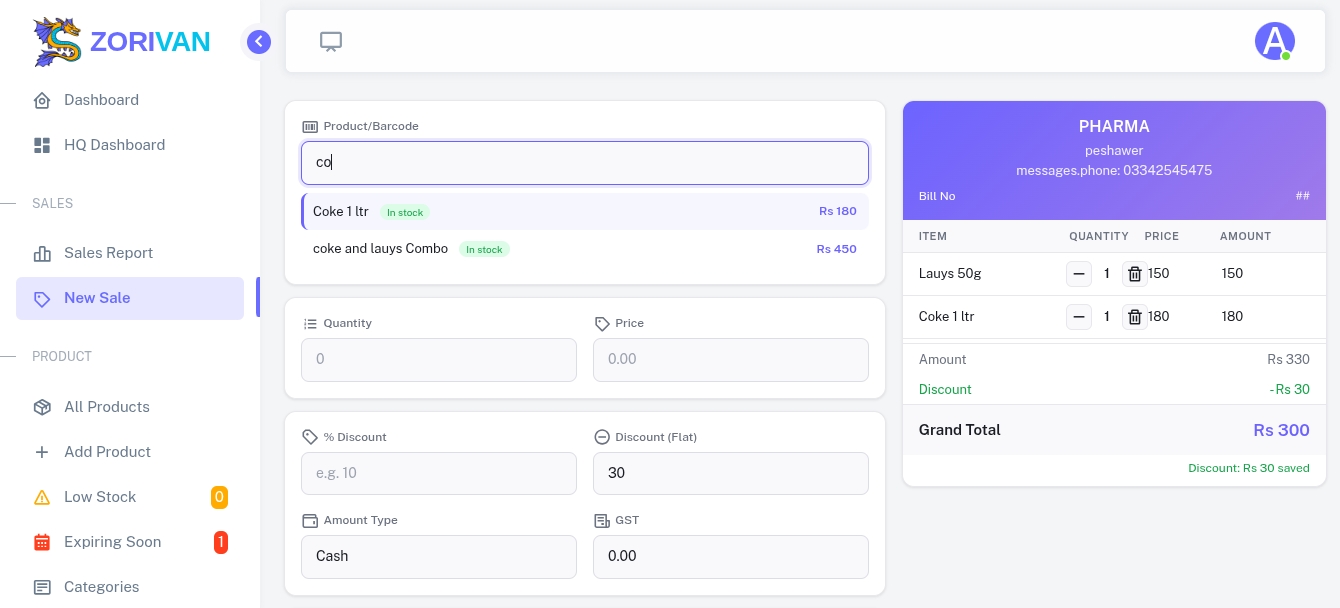
The POS screen is built for speed β€” fully keyboard and barcode-scanner driven.

Barcode scanning

Scan any EAN-8 or EAN-13 barcode to instantly add a product. Also works with USB barcode scanners β€” no extra setup needed.

Size & Color variants

Sell a shirt in 5 colors and 6 sizes at different prices. Navigate with arrow keys, select with Enter β€” never touch the mouse.

Partial returns

Customer bought 5 items, returns 2? Handle it. Partial returns with proportional GST and discount refund β€” stock automatically goes back.

Flexible payments

Cash, credit, or split payment. Discount by amount or percentage. GST inclusive or exclusive β€” all configurable per bill.

Combo products

Bundle items into a combo with a fixed price. IMEI / serial number tracking for electronics. Weighted items for meat and bakery.

Keyboard-first counter

↑↓ Navigate options · Enter Select · Esc Cancel. Full keyboard + barcode scanner support β€” no mouse needed at the counter.

Light & Dark Mode

Switch between light and dark themes anytime for a comfortable workspace. Your preferred theme is automatically remembered for every user.

Multi-Language Interface

Use the software in English, Urdu, or Pashto. Change the interface language instantly without affecting your business data.

Flexible Business Day Closing

Set your business closing time beyond midnight. For example, if your store closes at 2:00 AM, all sales from 12:00 AM to 2:00 AM are automatically recorded as part of the previous business day.

Pharmacy Mode

Sell medicines the right way

The only POS with built-in Box, Strip, and Tablet level selling β€” with automatic price calculation at each level.

Three selling levels

Box price set by you. Strip price auto-calculated from Box ÷ strips per box, and Tablet from Strip ÷ tablets per strip. Navigate levels with ↑↓ Enter, greyed out when stock isn't available.

Prescription handling

Mark medicines as prescription-required, upload a prescription photo at sale, and flag narcotics automatically. Drug schedule (G / H / X) tracked per product.

Expiry management

Expiry tracked per batch, not just per product, with near-expiry and expired-stock alerts. FIFO sells the oldest batch first, with decimal quantities for fractional boxes.

Pharmacy returns

Return Box, Strip, or Tablet separately with proportional GST refund per level. Stock is restored at the correct batch, and partial returns are supported.

Cafe & Restaurant Mode

From order to kitchen to bill

Table management, KOT printing, and a quick-add order screen β€” all connected.

Table management

Unlimited tables with custom names and live status β€” Available, Occupied, Reserved. One click opens a new order, and the table frees automatically after billing.

Kitchen Order Ticket

Prints straight to the kitchen printer with order no, table, type, items and notes. Works with QZ Tray or direct ESC/POS, 58mm or 80mm paper.

Quick order screen

Category tabs, tap-to-select product cards, and a built-in size/color picker. Keyboard shortcuts for quantity and a special note per item.

Orders dashboard

Every order in one list, filterable by status or date, with dine-in / takeaway / delivery counts and one-click status updates.

Stock Management

Smart inventory, always accurate

Batch-level stock tracking with FIFO ensures your oldest stock sells first and expiry is always visible.

Batch tracking

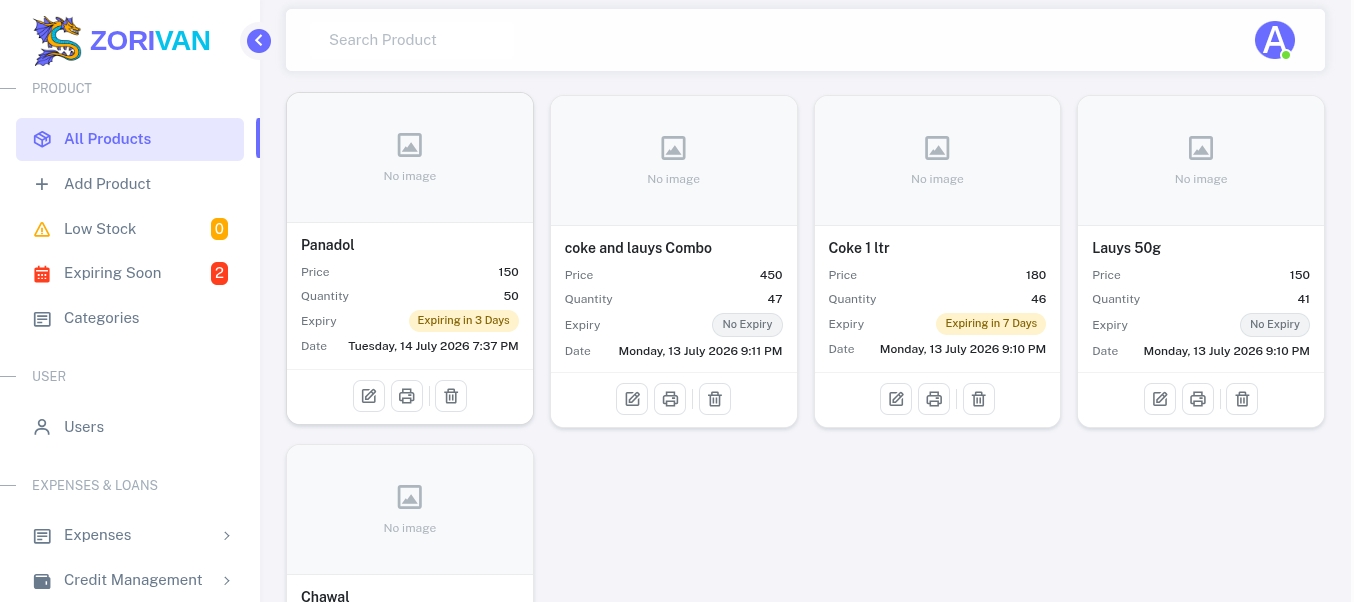
Stock added as batches with expiry & purchase price. FIFO deducts the oldest batch first, with decimal quantities for pharmacy fractional boxes.

Product variants

Unlimited size × color combinations, each with its own price, quantity and barcode. Combo products bundle multiple items together.

Smart alerts

Configurable low-stock and near-expiry alerts, plus best- and worst-selling product and a weekly sales comparison, right on the dashboard.

Weighted items

Set a price per kg, scan a scale barcode for auto-detected weight, or enter it manually with a live price preview and min/max validation.

Multi-Branch

One system, every location

Run a network of branches from a single HQ dashboard. Each branch sees only its own data.

Today β€” All Branches
Rs 2.4LTotal Sales
Rs 68KTotal Profit
3Active Branches
12Low Stock Items
Main Admin
Full control β€” all branches

HQ dashboard overview, add or edit branches, add branch managers, see all data, and full settings access including software type.

Branch Manager
Admin of own branch

Add cashiers & employees, edit branch settings, full POS access and own-branch reports β€” but no visibility into other branches.

Cashier
Counter-level access

Full POS to make sales, print bills and returns, and view own-branch reports β€” without user management or settings access.

Employee
Restricted access

No dashboard access and the session clears on login β€” for staff assigned tasks outside the POS system.

Data isolation

Every query is automatically filtered by branch. A cashier at Branch A can never see Branch B's data β€” not even by accident.

Per-branch settings

Each branch can have its own company name, phone, address, logo, and receipt footer β€” overriding the HQ default.

HQ reporting

Filter sales reports by branch, and compare today, week, and month across all locations from one screen.

Online + Offline

Never stop selling

Works completely offline. When internet is back, sync pushes your local data to the cloud and pulls updates from other branches.

01
Local Device

Full offline POS keeps running with no internet connection.

02
Cloud Server

Acts as the central sync hub once connectivity returns.

03
Other Branches

Pull the latest updates pushed from every location.

Push local → cloud

All unsynced records are pushed in one batch and marked synced once the cloud confirms.

Pull cloud → local

Only records updated since your last pull are downloaded β€” UUID-based, so there's never duplicate data.

Branch-aware sync

Branch users push and pull only their own data, while HQ syncs everything across every branch.

Internet check first

Connectivity is verified before every push or pull. If offline, you get a clear message β€” never a silent failure.

Finance & Suppliers

Complete business financials

Suppliers, expenses, loans, and instalments β€” all tracked with date-range reports.

Supplier management

Add suppliers with an opening balance, record purchases, track paid vs remaining per invoice, and run reports by any date range.

Expense tracking

Log daily expenses by category. They show on the dashboard, feed into every report, and factor into Profit = Sales − COGS − Expenses.

Loan management

Register borrowers with CNIC, address and phone, issue loans, record repayments one by one, and track pending totals on the dashboard.

Instalment system

Scheduled instalments with monthly due dates, overdue-payer lookups, automatic carry-over, and a weekly instalment dashboard chart.

Thermal Printing

Print anything, on any printer

ESC/POS direct connection or QZ Tray for browser-based printing. Works with all major thermal printer brands.

Sale receipt

Company name, items, quantities, prices, discount, GST and total β€” formatted for 58mm or 80mm paper.

Kitchen Order Ticket

Item, quantity, table number, order type and special notes, in large readable text for the kitchen.

Barcode labels

Print product barcodes with name and price to stick on shelves or products for quick scanning.

Printer types

USB, network (WiFi), serial port, and QZ Tray browser printing β€” with per-user printer configuration.

Reports & Dashboard

Know your numbers

Real-time dashboard with flexible date range reports β€” daily, monthly, yearly, or any custom range.

Sales dashboard

Today's sales, profit and expense at a glance, a week-over-week comparison chart, and best & worst sellers over 30 days.

Date range reports

Daily, monthly, yearly, or any custom range, filterable by branch, combining sales, profit, expense and supplier due in one view.

HQ dashboard

Every branch on one screen with today / week / month tabs, plus pending loans and supplier dues per branch.

Smart suggestions

Low-stock reorder alerts, near-expiry and expired products, upcoming instalment payers, and overdue loan counts.

Pricing

Pick what fits your business

Go fully offline for life, pay monthly, or buy a multi-branch license outright. Try it free for 14 days β€” no card required.

Free Demo
Rs 0/live demo

See exactly how it works before you pay a rupee β€” pre-loaded with sample products, sales, expenses, and supplier records.

  • Full POS β€” all business types
  • Sample products, stock & sales already loaded
  • Try supplier, expense & loan records
  • Explore reports & dashboard live
  • Your own data & branch access
Open Free Demo β€” No Signup

Single Shop · Offline

No internet needed β€” ever

Offline Monthly
Rs 1,800/month

All the power of the offline system, no big upfront payment. Cancel anytime.

No lock-in contract. No cloud backup.

  • Full POS β€” all business types
  • Pharmacy mode (Box/Strip/Tablet) & Cafe mode (KOT)
  • Unlimited products & sales
  • Thermal printing (USB/WiFi/Serial/QZ)
  • Supplier, expense & loan tracking
  • 100% offline β€” internet down? Still works
  • Cloud backup
  • Multi-branch

Perfect for: testing the system with low upfront risk.

Start Offline Monthly

Single Shop · Online

Cloud backup + runs from your phone

Online Lifetime
Rs 32,000/one-time

Pay once, own the full online system for life β€” breaks even in under a year vs monthly.

Hosting & domain are yours to arrange (approx. Rs 5,000–8,000/year).

  • Full POS β€” all business types
  • Pharmacy mode (Box/Strip/Tablet) & Cafe mode (KOT)
  • Unlimited products & sales
  • Supplier, expense & loan tracking
  • Cloud backup included
  • One-time payment β€” yours for life
  • Runs 100% on mobile β€” just open in browser, no app needed
  • Printing needs a computer, unless you have a WiFi printer β€” then mobile works too
  • Hosting & domain (client's own)

Perfect for: established shops ready to stop paying monthly, long-term.

Get Online Lifetime

Multi-Branch

Control every branch from one screen

Multi-Branch β€” Lifetime
Rs 85,000/one-time

Unlimited branches, own it outright β€” no monthly bill ever, no matter how many shops you open.

Optional Rs 15,000/year from year 2 for updates & support. Host it yourself.

  • Everything in Single Shop
  • Unlimited branches β€” no per-branch fee
  • HQ dashboard β€” all branches
  • Branch manager role
  • Branch-aware reports
  • Data isolation per branch
  • Free installation, year-1 support included
  • Runs 100% on mobile β€” just open in browser, no app needed
  • Printing needs a computer, unless you have a WiFi printer β€” then mobile works too

Perfect for: growing chains (5+ branches) where monthly-per-branch adds up fast.

Get Multi-Branch Lifetime
Custom / Enterprise
Contact us

Big operation, specific needs? We'll build exactly what you need.

  • Everything in Multi-Branch
  • Custom feature development
  • White-label branding
  • API integration support
  • Priority support
  • Team training session

Perfect for: large businesses needing integrations or custom branding.

Talk to Us

Common questions

FAQ

Does it work without internet?

Yes β€” fully. All sales, stock, and reports work completely offline. When internet is available, sync pushes data to the cloud and pulls updates from other branches.

Which printers are supported?

Any ESC/POS thermal printer β€” connected via USB, network (WiFi), or serial port. Also supports QZ Tray for browser-based printing without drivers. 58mm and 80mm paper sizes.

Can I switch business type later?

Yes. Change the software type in Settings anytime β€” from General to Pharmacy or Cafe. The right features activate immediately. No reinstall needed.

How many products can I add?

Unlimited. No product limit, no sales limit, no user limit. The only limit is your device's storage and database capacity β€” which is practically unlimited for retail use.

What happens if two branches sell the same product?

Each branch has its own stock. When sync is enabled, the product catalog is shared but sales and stock are kept separate per branch.

Is training included?

Multi-Branch plan includes a free installation and training session. Single Shop plan includes documentation and video guides. Custom plans include full team training.

Can a manager add their own cashiers?

Yes. Branch managers can add cashiers and employees to their own branch. They cannot add other managers or access other branches β€” only the Main Admin can do that.

Is the data safe if my computer crashes?

With sync enabled, your data is backed up to the cloud after every sync. Without sync, regular database backups are recommended β€” the system exports a backup file on demand.

Ready to upgrade your business?

From counter to cloud β€” ZORIVAN handles it. Get started today with a one-time payment and no monthly fees.